Find Duplicate Rows in Excel Online (Free)
Quickly detect duplicate records, remove repeated rows, generate unique data, and download a clean spreadsheet using Vicohi Duplicate Finder. No formulas, no software installation, and no technical skills required.
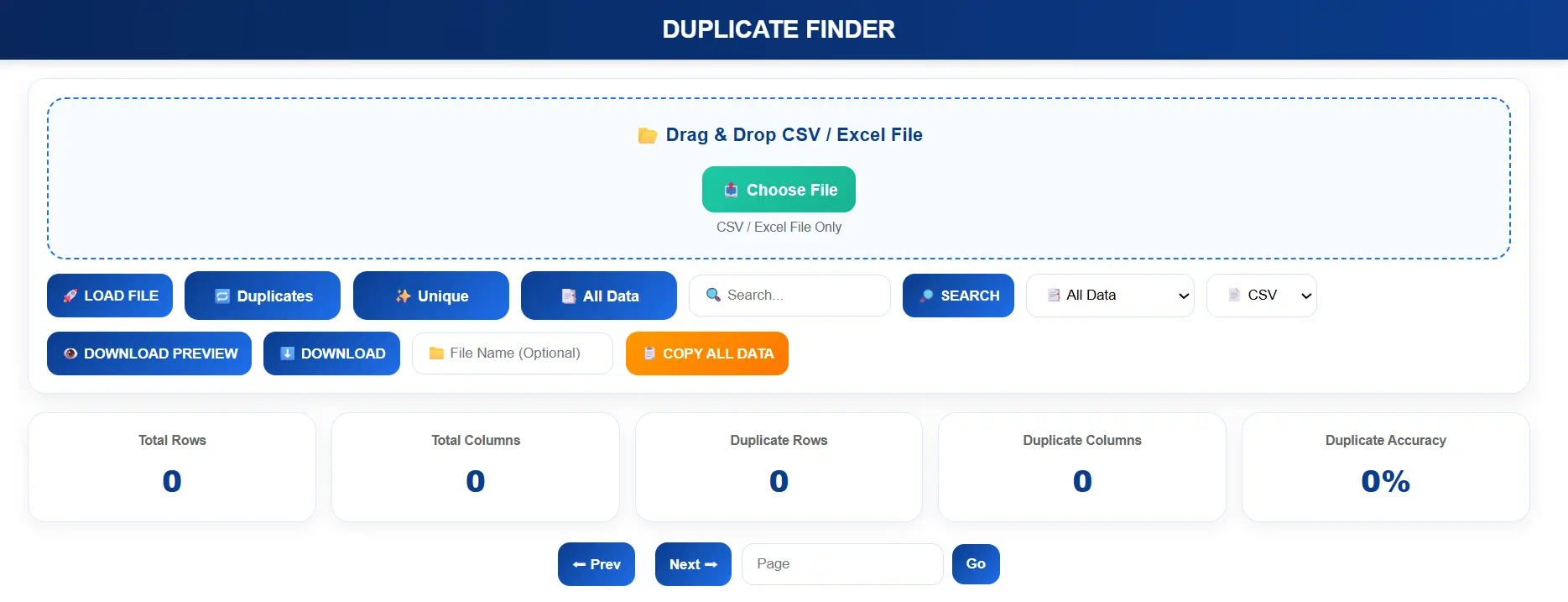
Duplicate rows are one of the most common spreadsheet problems faced by businesses, students, accountants, analysts, and marketers. Whether you're working with customer databases, sales reports, inventory lists, financial records, or exported CRM data, duplicate entries reduce accuracy and waste valuable time.
Instead of using complicated Excel formulas such as COUNTIF, Conditional Formatting, or manually comparing thousands of rows, you can use Vicohi Duplicate Finder to identify duplicate records automatically within seconds.
Simply upload your Excel or CSV file, let the tool analyze your spreadsheet, review duplicate rows, generate unique data, and download a clean file—all directly in your browser.
Why Duplicate Rows Become a Serious Problem
Every day, businesses and individuals work with Excel spreadsheets and CSV files containing thousands of records. As data grows larger, duplicate rows naturally appear because of repeated imports, manual entries, copied data, merged databases, CRM exports, and team collaboration.
Although duplicate records may seem harmless, they often create reporting errors, incorrect customer counts, duplicate email campaigns, inventory mismatches, financial calculation mistakes, and poor business decisions.
For example, if your spreadsheet contains 50,000 customer records and just 5% are duplicated, your reports, dashboards, and analytics can become inaccurate. That's why cleaning duplicate data should always be the first step before analyzing any spreadsheet.
Common Problems Caused by Duplicate Data
- Incorrect business reports and analytics
- Duplicate customer records
- Repeated email marketing campaigns
- Inventory management errors
- Payroll and accounting mistakes
- Duplicate invoices and payment records
- Slow spreadsheet performance
- Poor CRM data quality
- Time wasted manually checking records
- Unnecessary storage usage
Traditional Excel Methods Are Time-Consuming
Many users try to remove duplicate rows using Excel features like COUNTIF, Conditional Formatting, Remove Duplicates, Power Query, Pivot Tables, or advanced lookup formulas.
While these methods are effective, they often require spreadsheet experience and several manual steps. Beginners frequently spend hours learning formulas, selecting the correct ranges, checking results, and making sure important rows are not accidentally removed.
When your spreadsheet contains tens of thousands of rows, the process becomes even slower and increases the risk of human error.
A browser-based solution like Vicohi Duplicate Finder automates the entire process. Simply upload your file, let the tool scan every row, review duplicate records, and generate unique data within seconds.
Introducing Vicohi Duplicate Finder
Vicohi Duplicate Finder is a fast, browser-based spreadsheet cleaning tool that helps you identify duplicate rows and generate unique data without using Excel formulas or installing desktop software.
Whether you're working with customer databases, financial reports, inventory sheets, employee records, lead lists, or exported CRM files, the tool automatically scans your spreadsheet and highlights duplicate records within seconds.
Everything runs directly inside your browser, making the process fast, simple, and accessible from Windows, macOS, Linux, Chromebooks, and most modern mobile devices.
Why Choose Vicohi Duplicate Finder?
- Supports Excel (.xlsx) files
- Supports CSV files
- No software installation required
- No Excel formulas needed
- Fast duplicate detection
- Generate unique data with one click
- Copy cleaned data instantly
- Download Excel or CSV output
- Works completely inside your browser
- Free, fast, and easy to use
How to Find Duplicate Rows in Excel Online Using Vicohi
Using Vicohi Duplicate Finder is straightforward. Upload your spreadsheet, let the tool analyze the data, review duplicate records, and generate a clean dataset in just a few clicks.
Step 1 — Open the Duplicate Finder Tool
Visit the official Vicohi Duplicate Finder page and launch the tool directly from your browser.
https://vicohi.com/duplicate-finder.html
The interface is designed to be clean and beginner-friendly, allowing you to start working immediately without any setup.
Step 2 — Upload Your Excel or CSV File
Choose the spreadsheet that contains the records you want to analyze.
- 📂 Drag & Drop your Excel or CSV file
- 📤 Click Choose File
- 🚀 Press Load File
CSV files generally provide the fastest performance for very large datasets, although both Excel and CSV formats are fully supported.
Step 3 — Click Load File
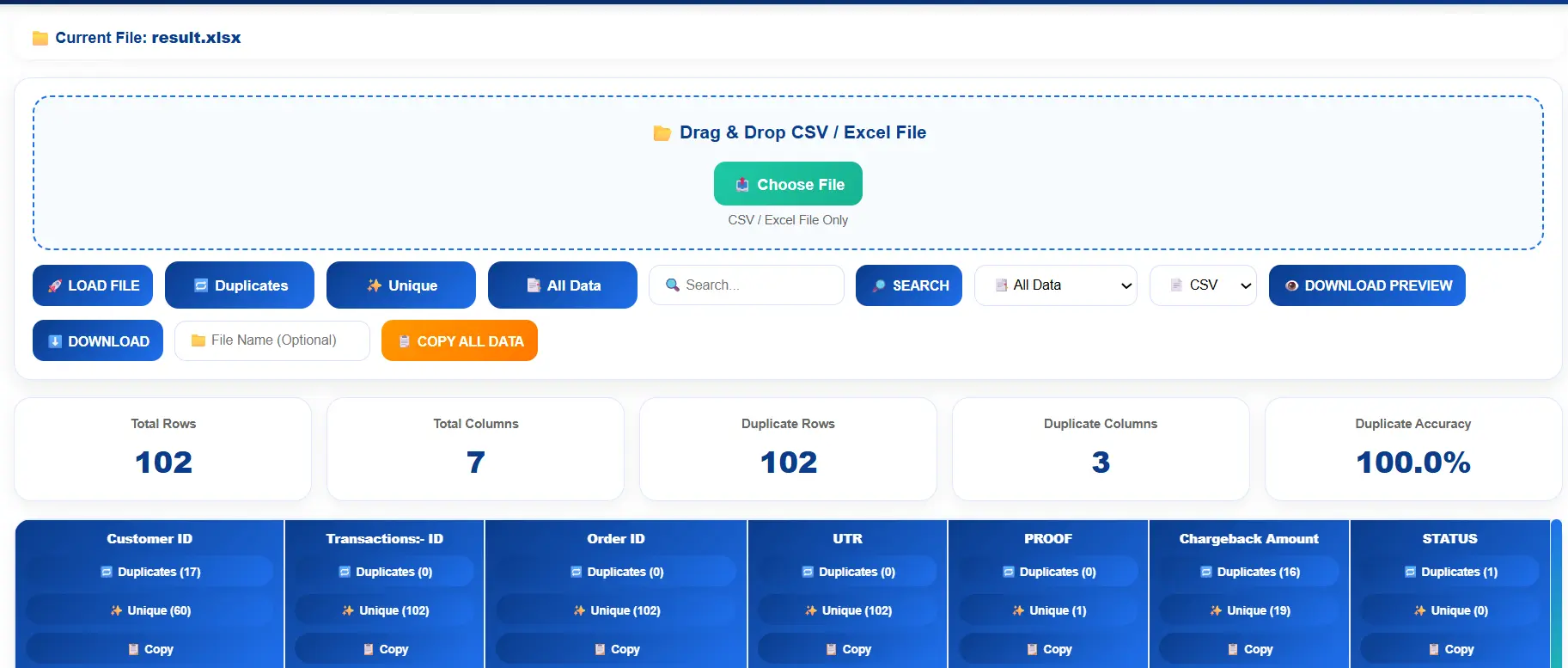
After selecting your spreadsheet, simply click the 🚀 Load File button. Vicohi immediately begins scanning every row to identify duplicate records.
Unlike traditional Excel methods, you don't need formulas, filters, or conditional formatting. The tool automatically analyzes your data and prepares multiple viewing options within seconds.
Even large spreadsheets are processed efficiently, making it easy to review duplicate records before cleaning your data.
Step 4 — Review Duplicate Records
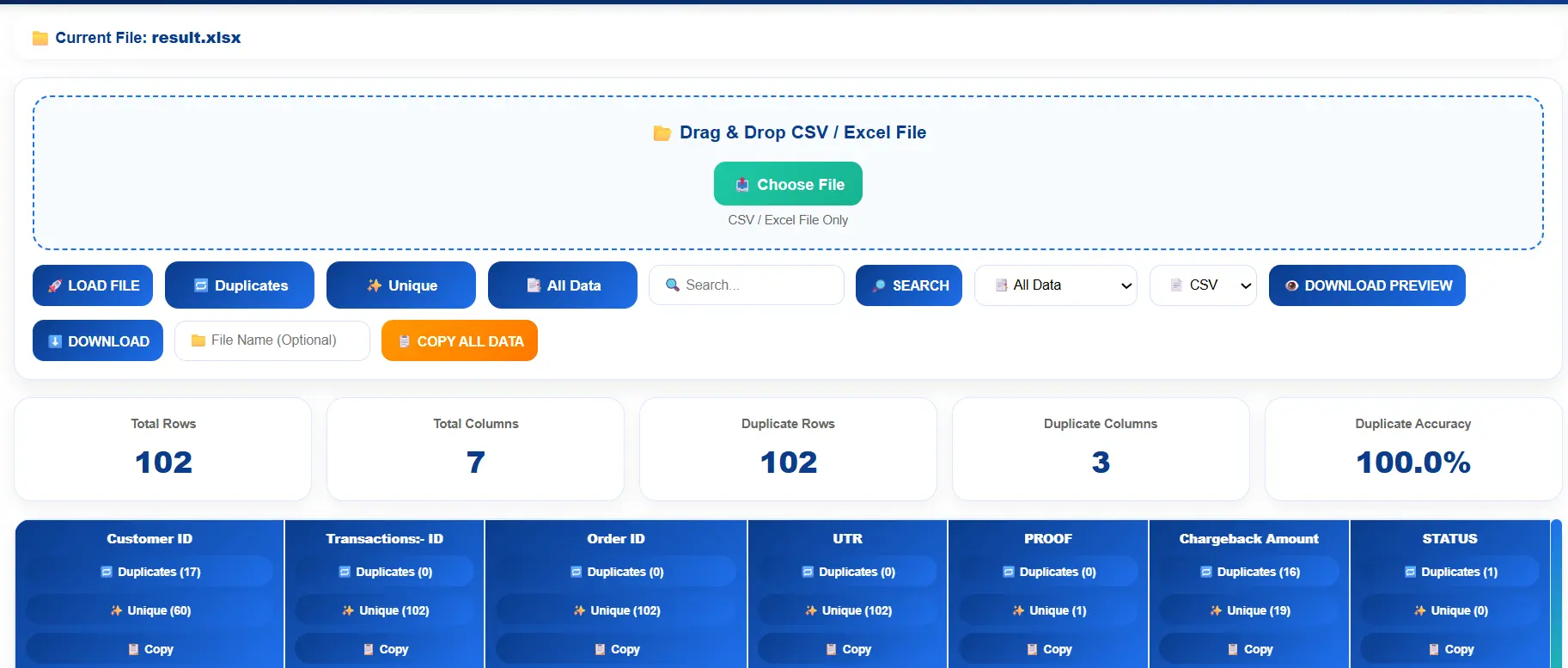
Once processing is complete, duplicate rows are displayed instantly. You can review every repeated record before deciding whether to remove duplicates or keep only unique entries.
This prevents accidental data loss and gives you complete control over your spreadsheet cleaning process.
Buttons You'll See Inside the Duplicate Finder Tool
Vicohi Duplicate Finder is designed with a simple interface so that anyone can clean spreadsheet data without technical knowledge.
| Button | Purpose |
|---|---|
| 🚀 Load File | Uploads and scans your Excel or CSV file. |
| 🔁 Duplicates | Displays only duplicate records found in the spreadsheet. |
| ✨ Unique | Shows only unique rows after removing duplicates. |
| 📑 All Data | Displays every row from the uploaded spreadsheet. |
| 📋 Copy Data | Copies the currently displayed results with one click. |
| ⬇️ Download | Downloads the cleaned spreadsheet in Excel or CSV format. |
These tools allow you to switch between duplicate data, unique data, and the complete spreadsheet without repeating the upload process.
How to Remove Duplicate Rows in One Click
Finding duplicate records is only the first step. The real goal is to generate a clean spreadsheet that contains only unique information.
With Vicohi Duplicate Finder, removing duplicate rows takes just a single click.
Simple Cleaning Process
- Upload your Excel or CSV file.
- Click 🚀 Load File.
- Review duplicate records.
- Click ✨ Unique.
- The tool automatically removes repeated rows.
- Copy or download your cleaned spreadsheet.
The cleaned dataset is generated instantly, helping you save hours of manual spreadsheet work.
How to Download the Clean Excel or CSV File
After removing duplicate rows, you can immediately export your cleaned spreadsheet without any additional processing.
Vicohi Duplicate Finder offers two convenient ways to use your cleaned data depending on your workflow.
📋 Copy All Data
Copy every visible row with a single click and paste it directly into Microsoft Excel, Google Sheets, LibreOffice Calc, Airtable, CRM software, ERP systems, or any spreadsheet application.
⬇️ Download Excel / CSV
Download your cleaned spreadsheet as an Excel or CSV file and continue working without duplicate records.
Whether you need to share cleaned reports with your team or import them into another system, exporting takes only a few seconds.
Why Use Vicohi Duplicate Finder Instead of Excel Formulas?
Microsoft Excel provides several built-in ways to detect duplicate data, including COUNTIF, Conditional Formatting, Power Query, Remove Duplicates, and Pivot Tables. While these features are useful, they often require spreadsheet experience and multiple manual steps.
Vicohi Duplicate Finder simplifies the entire workflow by automatically scanning your spreadsheet, identifying duplicate rows, generating unique data, and allowing instant export—all directly inside your browser.
| Feature | Vicohi Duplicate Finder | Traditional Excel |
|---|---|---|
| Works Online | ✅ Yes | ❌ No |
| No Formula Required | ✅ Yes | ❌ No |
| One-Click Duplicate Detection | ✅ Yes | ❌ Multiple Steps |
| One-Click Unique Data | ✅ Yes | ❌ Manual Process |
| Excel (.xlsx) Support | ✅ Yes | ✅ Yes |
| CSV Support | ✅ Yes | ✅ Yes |
| Browser-Based | ✅ Yes | ❌ Desktop Required |
| Beginner Friendly | ✅ Yes | ⚠ Moderate |
Who Can Use Vicohi Duplicate Finder?
Vicohi Duplicate Finder is built for anyone who regularly works with spreadsheet data—from beginners to enterprise professionals.
Business Owners
Maintain clean customer databases and accurate business reports.
Accountants
Remove duplicate invoices, transactions, and payment records.
HR Teams
Keep employee spreadsheets organized before payroll processing.
Students
Organize assignments, research datasets, and academic spreadsheets.
Researchers
Remove repeated survey responses and experimental datasets.
Sales Teams
Clean CRM exports and customer lead databases.
Digital Marketers
Eliminate duplicate email lists before launching campaigns.
Freelancers
Prepare accurate spreadsheets for clients in less time.
Top Benefits of Using Vicohi Duplicate Finder
Keeping spreadsheet data clean improves reporting accuracy, saves time, and reduces costly mistakes. Vicohi Duplicate Finder automates duplicate detection so you can focus on analyzing your data instead of cleaning it manually.
- Detect duplicate rows in seconds
- Generate unique data instantly
- No Excel formulas required
- Supports Excel (.xlsx) and CSV files
- Fast browser-based processing
- Copy cleaned data with one click
- Download cleaned spreadsheets instantly
- Beginner-friendly interface
- No software installation
- Works on Windows, macOS, Linux & Chromebook
- Improves reporting accuracy
- Reduces manual spreadsheet work
- Prevents duplicate customer records
- Ideal for business and personal use
Real-World Examples
Customer Database Cleanup
Businesses often merge customer information from multiple sources, resulting in duplicate names, emails, and customer IDs. Vicohi quickly identifies repeated records and helps maintain a clean customer database.
Email Marketing Lists
Duplicate email addresses increase campaign costs and can negatively impact engagement. Removing duplicate contacts before importing them into your email marketing platform improves campaign quality.
Inventory Management
Duplicate product entries may produce inaccurate stock reports. Cleaning inventory spreadsheets ensures better tracking and reporting.
Financial Reports
Repeated transaction rows can distort revenue calculations and financial summaries. Removing duplicates helps maintain accurate financial records.
Supported File Formats
Vicohi Duplicate Finder supports the most commonly used spreadsheet formats, making it easy to work with business reports, exported databases, and personal spreadsheets.
| File Format | Supported |
|---|---|
| Excel (.xlsx) | ✅ Yes |
| CSV (.csv) | ✅ Yes |
| Google Sheets Export (.csv) | ✅ Yes |
| Excel (.xls) | Recommended after converting to .xlsx |
100% Browser-Based Processing
Vicohi Duplicate Finder works entirely inside your web browser. There's no need to install desktop software, browser extensions, or complicated spreadsheet plugins.
Simply upload your Excel or CSV file, review duplicate records, generate unique data, and download the cleaned spreadsheet—all from a single interface.
Why Users Prefer Browser-Based Tools
- No installation required
- Works across multiple operating systems
- Simple and intuitive interface
- Accessible from anywhere
- Fast processing for everyday spreadsheet tasks
Why Clean Data Matters
Accurate data is the foundation of reliable reporting, analytics, and business decisions. Duplicate records can lead to incorrect reports, repeated communications, inventory issues, and unnecessary manual work.
Regularly cleaning spreadsheet data helps maintain consistency, improves productivity, and ensures your reports remain trustworthy.
Start Cleaning Your Spreadsheet Today
Upload your Excel or CSV file, detect duplicate rows instantly, generate unique data with one click, and download a clean spreadsheet within seconds.
🚀 Open Vicohi Duplicate FinderBest Practices to Avoid Duplicate Rows in Excel
Although Vicohi Duplicate Finder makes removing duplicate rows incredibly simple, preventing duplicate records from appearing in the first place can save even more time. Following a few spreadsheet management practices helps maintain clean, organized, and reliable data.
Recommended Best Practices
- Always keep a backup of your original spreadsheet.
- Use a unique ID whenever possible.
- Avoid importing the same file multiple times.
- Verify CSV exports before merging datasets.
- Clean spreadsheet data regularly.
- Use consistent email, phone number, and date formats.
- Remove blank rows before checking duplicates.
- Keep column names standardized.
- Review duplicate records before deleting them.
- Maintain a single master spreadsheet for important data.
Why Thousands of Users Choose Vicohi Duplicate Finder
Many duplicate removal tools are either slow, difficult to use, or require software installation. Vicohi was built to provide a fast, modern, and user-friendly experience for everyone—from beginners to professionals.
Whether you're cleaning a spreadsheet with a few hundred rows or a large CSV file containing thousands of records, Vicohi helps you complete the job in just a few clicks.
⚡ Fast Processing
Analyze spreadsheets within seconds using an optimized duplicate detection engine.
🌐 Browser Based
Everything works online without installing Excel add-ins or desktop software.
🆓 Free to Use
Access powerful spreadsheet cleaning features without expensive subscriptions.
📊 Accurate Results
Quickly identify duplicate records while preserving your original spreadsheet structure.
Explore More Free Tools from Vicohi
If you regularly work with Excel, CSV files, and business data, these free online tools can help you automate even more daily tasks.
Frequently Asked Questions
1. How can I find duplicate rows in Excel online for free?
Upload your Excel or CSV file to Vicohi Duplicate Finder, click Load File, and the tool automatically detects duplicate rows within seconds.
2. Can I remove duplicate rows automatically?
Yes. Simply click the ✨ Unique button and Vicohi instantly generates a clean spreadsheet containing only unique records.
3. Which file formats are supported?
Vicohi Duplicate Finder supports Excel (.xlsx) and CSV files. CSV is recommended for very large datasets because it usually loads faster.
4. Do I need Excel formulas?
No. The tool automatically identifies duplicate records, so you don't need formulas such as COUNTIF, VLOOKUP, or Conditional Formatting.
5. Can I download the cleaned spreadsheet?
Yes. After removing duplicates, you can either copy the cleaned data or download it as an Excel or CSV file.
6. Is Vicohi Duplicate Finder free?
Yes. The tool is available online and is designed to help users clean spreadsheet data quickly and easily.
7. Does the tool work on mobile devices?
Yes. Since Vicohi is browser-based, it works on desktops, laptops, tablets, and most modern smartphones.
8. Is my spreadsheet secure?
Please refer to the latest Privacy Policy on the Vicohi website for information about file handling and data processing.
9. Who can use this tool?
Students, accountants, business owners, analysts, marketers, HR teams, researchers, freelancers, and anyone who works with Excel or CSV files can benefit from Vicohi Duplicate Finder.
10. Why should I remove duplicate records?
Removing duplicate records improves reporting accuracy, prevents repeated customer information, reduces spreadsheet errors, and saves valuable time.
Final Thoughts
Finding duplicate rows manually in Excel can be slow and frustrating, especially when working with thousands of records. Instead of relying on formulas, filters, or complicated spreadsheet features, Vicohi Duplicate Finder automates the entire process in just a few clicks.
Upload your Excel or CSV file, identify duplicate records instantly, generate unique data, and download a clean spreadsheet—all directly from your browser.
Whether you're managing customer databases, sales reports, inventory lists, HR records, financial spreadsheets, or marketing data, Vicohi helps you save time while keeping your data clean and accurate.